
Getting started
The designer, feature by feature
Everything your customers can do on the shirt, try all of it live on the demo.
Everything your customers can do on the shirt. Try all of it live on the demo, it’s the same designer.
Garments & colors
Fourteen garments are built in. Starter opens 5, Advanced 10, Pro all 14: infant, toddler, youth and adult tees, long sleeve, sweatshirt, hoodie, ladies cuts, and heathers. Each one carries its real color range. Front and back are separate canvases with their own print areas. Pro shops add as many of their own garments as they stock with My Garment Wizard.
Text
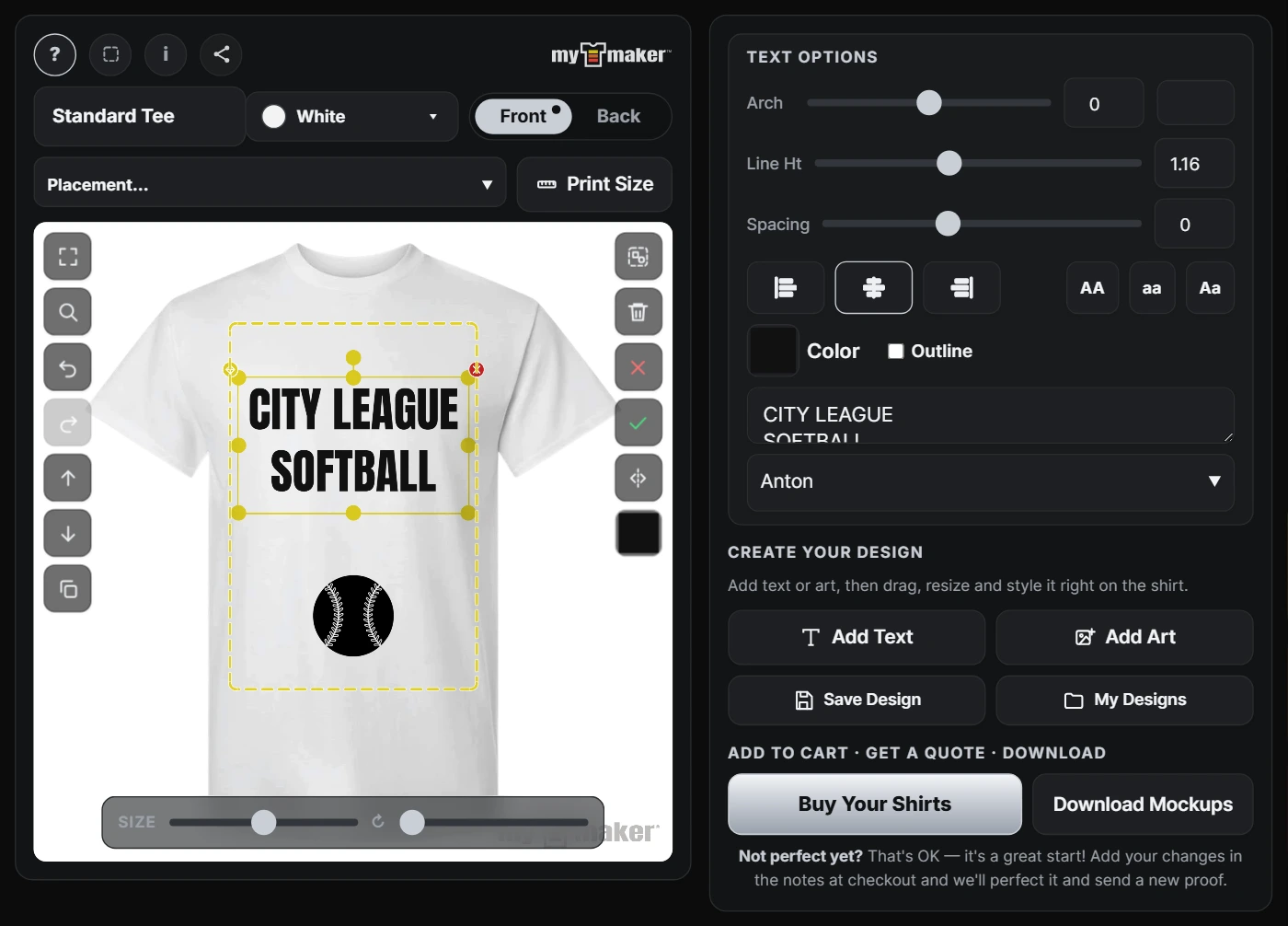
Full text engine: font menu, size, any color, letter spacing, line height, alignment, upper/lowercase, multi-line. Plus the stuff customers actually ask for:
- Arch/curve, team-jersey curved text.
- Outline, a clean outward border ring around the letters.
- Free move, resize, and rotate with handles, same on phone and desktop.
Art
- Built-in library, organized by category with a search box that covers every design in every category. Tap any design to add it, then recolor it right on the shirt.
- Uploads, customer PNG/JPG from phone or desktop.
- Background remover, one tap lifts the background off an upload, in the browser, free on every plan.
- AI Art (Pro), type a prompt, place the result.
- Own SVG art (Advanced & Pro), shops load their own vector art into the library; SVGs stay true vectors: recolorable and crisp at any print size.
Trust & honesty on the canvas
- Print-area boundary, the dashed line is the real printable zone; art outside it gets flagged, and the check is pixel-accurate even on rotated objects.
- 📏 Print-size readout, selected object shows its true printed size in inches.
- Low-DPI warning, an upload scaled too big to print clean warns the customer before the order, not you after it.
Canvas tools
Undo/redo, duplicate, delete, bring forward / send backward layering buttons on every selected object, tap-to-select with handles, mobile-first layout that works down to small phones.
Finishing moves
- Download mockup: PNG proof.
- Quote request, design + contact lands in the shop’s inbox. All plans.
- Buy, straight into WooCommerce checkout. All plans.
- Save / My Designs, logged-in customers keep their work. All plans.
- Share, one tap makes a link; the phone’s native share sheet or a copied URL. Anyone opening it sees the design live in the designer. All plans.
- Templates (Pro), customers start from your pre-built designs instead of a blank shirt; they sit at the top of the art library as their own ★ Templates category.
What the shop gets from all this
Every finished design produces print files, mockups, transparent print PNG, and on Advanced and Pro a true vector SVG + editable PDF for library-art/text designs. Details: Print files.
Need a hand?
Use the contact form, answered by a working print shop within 1–2 business days.